 TRACEBUILD
Construction takeoff.
Built for your next bid.
Measure areas, count symbols and mark up PDF plans in your browser. Review detected spaces and runs, then export quantities to Excel for pricing. You keep control of the takeoff.
Free during early access · No credit card · No install
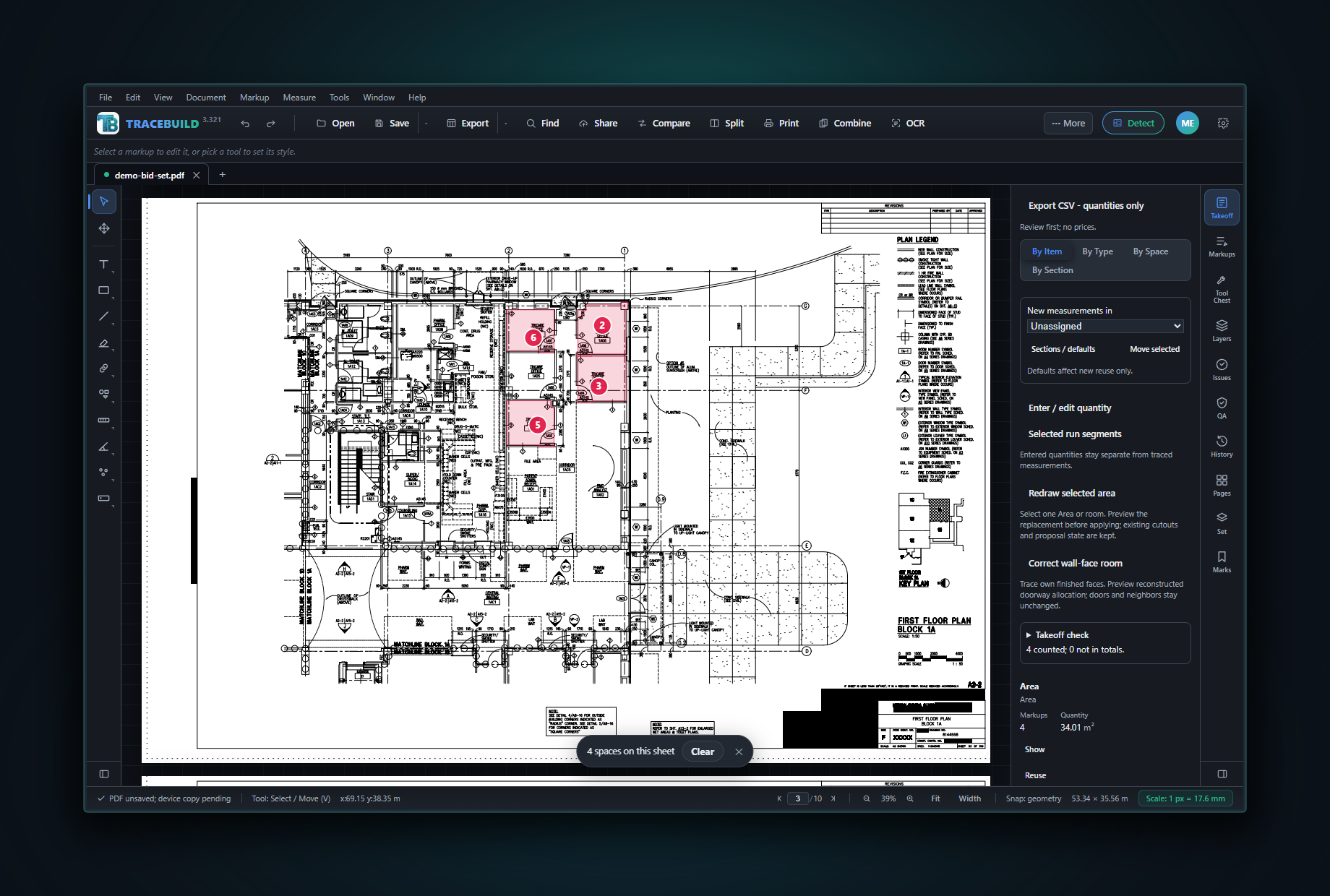
Your next takeoff, in three clear steps.
TRACEBUILD Lite is browser-based construction takeoff software for measuring areas, lengths and counts on PDF plans. It gives you quantities to review and export. You add the pricing.
Open & calibrate
Open your plan and set its scale from a known dimension. Check the scale before measuring.
Get the scale rightMeasure & review
Measure by hand or review detected spaces and runs. Refine boundaries, including doorway openings.
See a real takeoffExport & price
Export reviewed quantities to Excel or CSV. Apply your material rates, labor, overhead and profit.
Build your worksheet
Less retyping. More time to review the job.
Keep your measurements, plan notes and takeoff quantities together. Start with the tools you need for the next job, then take the quantities into your own pricing workflow.
Markup & measure
Set the scale, measure areas and lengths, count symbols and place notes on the drawing. Keep the question beside the detail.
Explore the markup toolsReview the takeoff
Use Detect Spaces and Detect Runs for a first pass. Review the proposed rooms and runs, refine what needs attention and keep the measurements you need.
See what Lite includesTake it into Excel
Export quantity totals by space and type. Stable export keys help your pricing formulas keep matching when a drawing revision changes the takeoff.
See the export workflow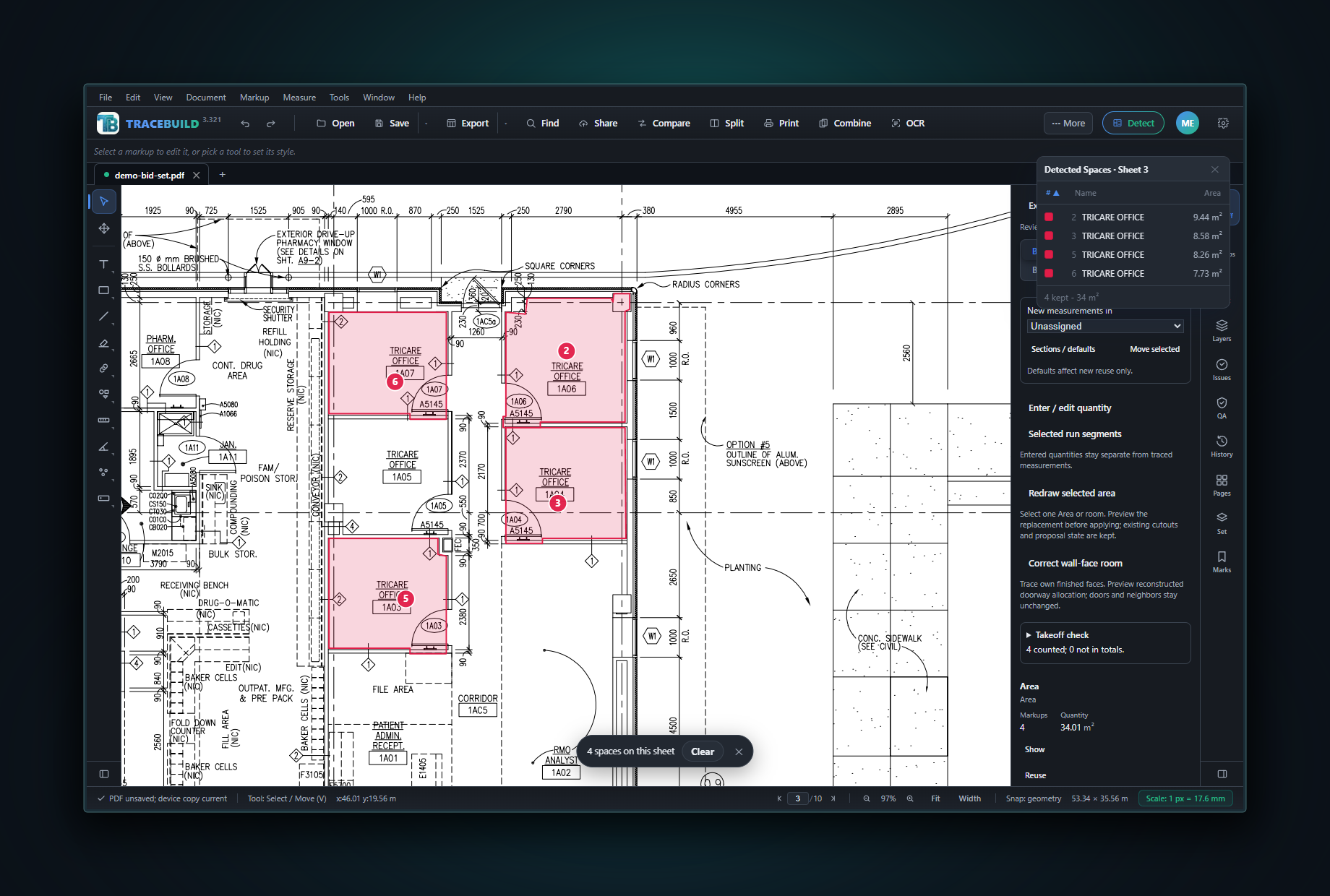
From room outlines to quantities you can check.
Review the proposed spaces, refine the boundaries and keep the areas you need. Adjust an outline through a door opening and the quantity updates with it.
- Review on the plan. See each room beside its measured area.
- Keep the call. Correct boundaries before you use the quantities.
- Take it into Excel. Export quantities for your pricing workflow.
What to measure and count for your trade.
Each trade page lists what an estimator takes off, in which units, and how TRACEBUILD handles each step. The plumbing, flooring, painting and concrete pages walk through a takeoff on a real public-domain plan set, with the exported workbook to download.
Start with a worked example: plumbing takeoff software & fixture counts flooring takeoff software & room areas
New to takeoff? Start with how to do a construction takeoff, check your sheets against the drawing scale chart, and record quantities in the free takeoff template (Excel).
Your estimate is written on your machine.
The TRACEBUILD Pro Windows app, coming soon, bundles a capable AI model that runs entirely on your computer through a local engine. Your priced takeoff becomes a client-ready narrative. No account, no upload, no internet required. The dollar figures stay authoritative; the AI writes the scope, assumptions and review around them, and you keep the call.
- 100% private. Client drawings never leave your machine, a real data-privacy guarantee, not a policy.
- Works anywhere. Jobsite trailer, plane, or a spotty connection: it runs fully offline, out of the box.
- Grounded in your numbers. Executive summary, scope by system, inclusions & exclusions, assumptions, value-engineering ideas and possibly-missing scope.
The complete PDF markup toolkit. Then everything else.
A full, professional PDF markup, measurement and document toolkit is the foundation of TRACEBUILD, the tools professionals use every day, in a fast, modern interface. Estimating, collaboration and AI are layered on top as added value. Markup, measurement and construction takeoff ship free in Lite while in early access; AI takeoff, estimating and collaboration unlock with the coming Pro app.
Put the question on the drawing.
Cloud the detail, point to the issue and add a clear note. Keep the context of an RFI or review comment right on the sheet your team is reading.
Explore the markup toolkit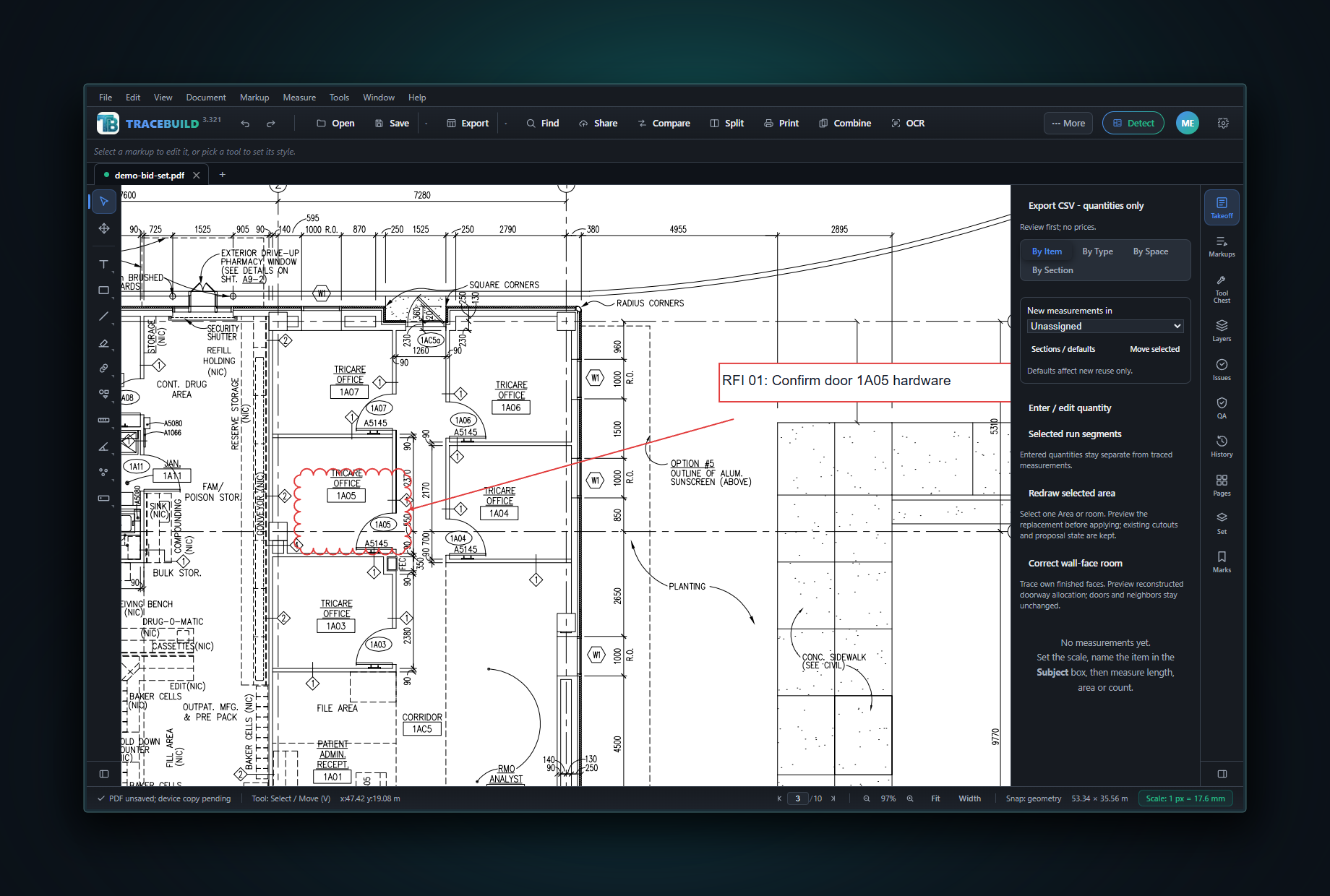
Everything you expect. Then more.
Everything you expect
The full markup, measurement, page-editing, forms, redaction and set-management toolkit professional teams rely on every day, in a fast, modern interface.
Plus an estimator PRO
A complete takeoff and estimating platform: cost database, labor hours, ancillary auto-explosion and bid markups, feeding a one-click AI basis of estimate.
Respects your data PRO
The AI runs on your machine. No cloud round-trip, no account required, no client drawings leaving your control. Fast, offline, and yours.
Switching from Bluebeam Revu 20?
Revu 20 support ended July 31, 2026. On December 31, 2026, Revu 20 loses access to Studio Sessions, Studio Projects and API integrations. Most installed perpetual copies keep running after that; some license types are deactivated. See what stops working, what keeps working, and your options.
TRACEBUILD Lite works on Windows and Mac in any modern browser. Weighing the cost first? See free and low-cost takeoff software, compared, what takeoff software costs, and PlanSwift vs TRACEBUILD.
Bring a plan.
We’ll bring the walkthrough.
Use a real drawing, inspect the quantities and take the worksheet with you. These resources show the work behind the result.
Follow a takeoff on a real plan
From the scale check to reviewed quantities, with a worksheet you can inspect.
Follow the walkthrough Free Excel downloadGive your quantities a home
Start with a takeoff template for quantities, units and your own pricing.
Get the Excel template Field referenceStart with the right scale
Check imperial and metric drawing scales before a measurement becomes a quantity.
Use the drawing scale guideOur published benchmark measures wall detection, with downloadable test material and stated limits.
Lite gives you the quantities, free. Pro adds the pricing and the AI.
TRACEBUILD Lite runs in any browser and is free while in early access, then $4.99/user/month. AI Auto-Takeoff, live sessions, digital signatures, estimating and the on-device AI estimator are Pro exclusives on the Windows desktop app.
- Full markup toolkit: text, notes, clouds, callouts, shapes, stamps & ink
- Text-aware highlight, underline & strikeout
- Measure length, area, perimeter, volume, angle, radius & count
- Construction takeoff: quantities roll up live by space & type, export to CSV/Excel
- Revision-stable Excel/CSV export: per-trade tabs with stable keys your pricing formulas keep matching after an addendum
- One-click Detect Spaces & Runs: a review-ready takeoff head start: auto room areas and wall/pipe runs pre-classed by trade, for you to refine
- Takeoff QA panel: audit calibration, geometry & duplicates
- Calibrate to any scale with snap-to-geometry precision · DXF import
- 251-glyph CAD symbol library across 16 trades
- Drawing sets, slip-sheets & bookmarks
- Page editing: insert, delete, rotate, crop & combine
- OCR plus unified text, visual & symbol search
- True redaction
- Multi-format save: PDF, PNG, JPEG · 22 fonts (19 subset-embedded)
- Auto-save, crash recovery, Tool Chests & custom profiles
- Runs in any modern browser on Windows or Mac · no install, no download
$4.99/user/month after early access. AI Auto-Takeoff, live sessions, digital signatures, estimating & AI unlock with Pro.
- Everything in Lite, plus the full Windows desktop app
- Priced takeoff: budgetary cost ranges & labor on top of your Lite quantities
- Cost database & assemblies (material, labor, equipment)
- Labor hours by craft & ancillary auto-explosion
- Bid markup engine: overhead, profit, contingency, tax & bond
- AI Auto-Takeoff: detect rooms, trace runs & count symbols in one click
- Private on-device AI estimator: a full basis of estimate, 100% offline
- Ask AI: chat with your takeoff & plan, on-device
- Scope-risk scan & RFI export: flag AS NEEDED / BY OTHERS language, send the questions
- Compare revisions: addendum diff with auto-clouded changes
- Digital signatures & certification (PKI)
- AES-256 password protection & permissions
- Live collaboration sessions (code + PIN)
- Proposal & MTO exports: branded PDF + multi-tab Excel
- Batch processing at scale & priority support
Clear answers.
No guesswork.
What Lite does today, where your drawings go and how the quantities fit into your bid.
Meet TRACEBUILD Ask a product questionWhat is construction takeoff software?
Construction takeoff software measures material quantities from plans, such as floor area, wall length and fixture counts. TRACEBUILD Lite combines PDF measurement, markup and reviewed quantity takeoff in a browser. Estimating comes next: you apply costs, labor and markups to those quantities. Compare takeoff and estimating.
Is TRACEBUILD Lite free?
TRACEBUILD Lite is free during early access, with no credit card required to start. After early access, the listed price is $4.99 per user per month. TRACEBUILD Pro for Windows is coming soon at $19.99 per user per month. Compare Lite and Pro.
Does it work on a Mac or Windows computer?
TRACEBUILD Lite runs in a modern browser, including Chrome, Edge, Safari and Firefox, on Windows or macOS. There is no desktop installation for Lite. The coming TRACEBUILD Pro desktop app is for Windows 10 and Windows 11. See takeoff on a Mac.
Can I export takeoff quantities to Excel?
Yes. TRACEBUILD Lite exports takeoff quantities to Excel and CSV. Quantities roll up by space and type, and stable export keys help your pricing formulas keep matching across drawing revisions. You add your own material rates, labor, overhead and profit in your pricing workflow. See the Excel export guide.
Are my construction drawings uploaded?
By default, markup, measurement and takeoff process your drawings on your own device. Those actions do not require uploading the drawing. If you choose a cloud sharing feature, that feature uploads the content you share. Read the privacy details.
Do I need to review an automatic takeoff?
Yes. Detected spaces and runs are a first pass for you to review. Check the drawing scale, room boundaries, openings and classifications before accepting quantities or using them in a bid. The published accuracy benchmark covers wall detection only. Read the benchmark and its limits.
Your next bid starts
with a better takeoff.
Create a free early-access account and open it right in your browser. No credit card required. Early-access members keep their account when paid plans launch. The Pro Windows app is coming soon.
Version 3.323 · Lite in any browser (free while in early access) · Pro for Windows 10 / 11 coming soon