Construction takeoff software for Mac, in the browser
Most dedicated takeoff programs, including PlanSwift and On-Screen Takeoff, are Windows software, and Bluebeam's Revu desktop app has been Windows-only since Revu for Mac ended in 2023. On a Mac you either run Windows in a virtual machine or use a browser tool. TRACEBUILD Lite is a browser tool, free during early access.
By default, your drawings are processed on your own device and are not uploaded to mark up, measure or take off. After early access, Lite is $4.99 per user per month.
Why Mac options got thin
Revu for Mac ended in 2023
Bluebeam's end-of-life table lists June 28, 2023 as the end of life for Revu for Mac. Bluebeam's current plans include Revu for Windows plus Bluebeam on web and mobile.
Takeoff desktops are Windows
PlanSwift is designed for and tested on Professional and Enterprise editions of Windows; On-Screen Takeoff lists Windows 11 Pro or Enterprise. Neither has a Mac version.
Apple silicon closed Boot Camp
ConstructConnect notes that on Macs with Apple M-series chips, Boot Camp is not available, so virtualization is the only way to run its Windows software.
Sources: Bluebeam end-of-life table, Bluebeam pricing, PlanSwift system requirements, On-Screen Takeoff system requirements. Checked September 24, 2026.
What running Windows takeoff software on a Mac really costs
Before the takeoff license, you need a Windows license and a virtualization program. At the list prices we checked, that is about $300 in the first year for Windows 11 Pro plus Parallels Desktop Standard, and about $100 a year after that for the Parallels subscription. Then comes the takeoff license, and the Mac has to share memory with Windows.
| Item | Price checked September 24, 2026 | Why you need it |
|---|---|---|
| Windows 11 Pro | $199.99 one time (Microsoft Store) | PlanSwift is tested only on Pro or Enterprise; On-Screen Takeoff lists Windows 11 Pro or Enterprise |
| Parallels Desktop, Standard | $99.99 per year list (Parallels) | Runs Windows on the Mac; a Windows license is not included |
| Parallels Desktop, Pro or Business | $119.99 or $149.99 per year list | More memory and CPUs per virtual machine, and business license management |
| The takeoff license | PlanSwift from $2,000 per year; OST quote only | See free and low-cost takeoff software for sources |
Worked out for one estimator in the first year: Windows 11 Pro ($199.99) plus Parallels Standard ($99.99) is $299.98, and with PlanSwift Essential ($2,000) it comes to $2,299.98. Parallels was running a promotion below list price when we checked, so your price may be lower; the Windows license is still extra.
Two practical costs do not show up on an invoice. ConstructConnect says its technical support cannot help with an On-Screen Takeoff install under Parallels, even though it expects it to work. And a Windows virtual machine takes memory from macOS while it runs, which matters on a laptop that is also opening 300-sheet plan sets.
The browser route
A browser tool runs on the Mac's own browser, so there is nothing to install, no Windows license and no virtual machine. TRACEBUILD Lite does PDF markup, measurement to scale and quantity takeoff this way, and exports the quantities to Excel, so pricing stays in the workbook you already use.
- Open the app in your browser. TRACEBUILD Lite supports Safari, Chrome, Edge and Firefox. Create a free early-access account; no credit card.
- Drag in your PDF plan set. By default it is processed on your Mac and not uploaded.
- Set the scale and check it. Read it from the sheet's scale note, pick a standard preset, or calibrate from a known dimension, then measure a printed dimension to confirm.
- Measure, count and review. Trace areas and runs, count items, or let Detect Spaces and Trace Walls propose rooms and walls for you to review. Wall tracing is measured in our published wall-detection benchmark.
- Export to Excel or CSV. In Safari and Firefox, which do not offer the browser's save-file picker, exports go to your Downloads folder instead of a Save As dialog.
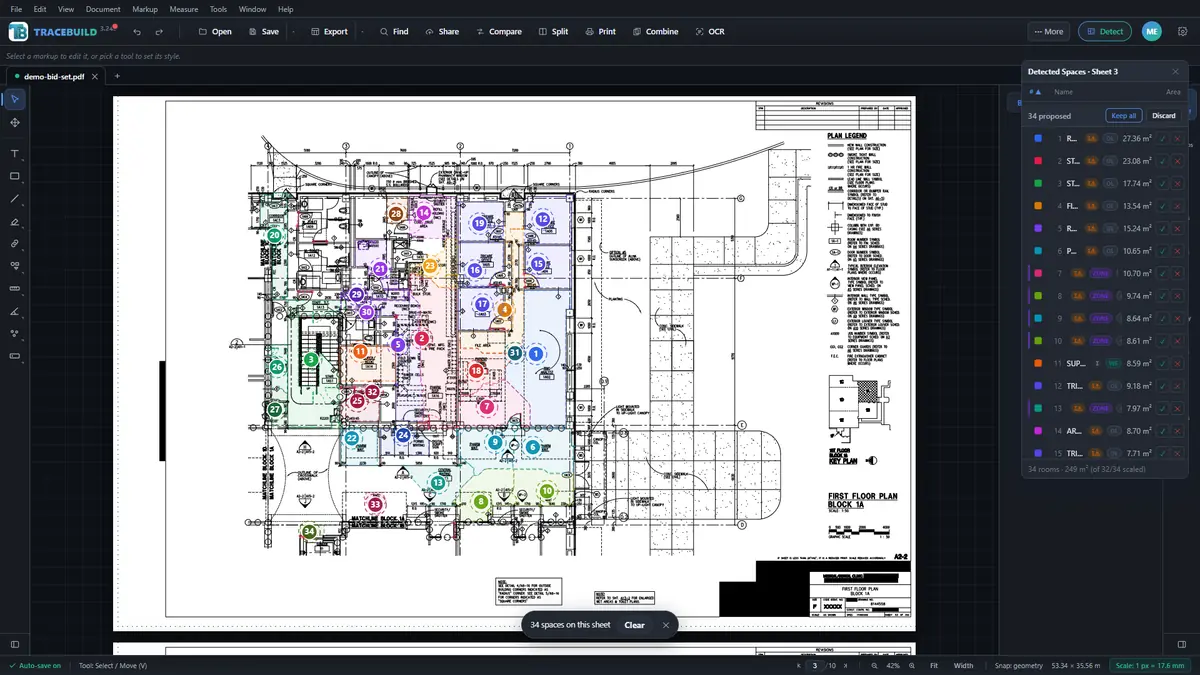
The full walk-through, on a real public-domain plan sheet with the actual quantities, is in how to do a construction takeoff.
The honest fine print
On a Mac, TRACEBUILD Lite in the browser is the product. TRACEBUILD Pro, with integrated cost estimating and a private on-device AI estimator, is a Windows desktop app and is coming soon; it is not available yet. If your team is mixed, Mac estimators on Lite and Windows estimators on Pro will work on the same PDFs. Lite does not replace Bluebeam Studio Sessions, and it has no assemblies or cost database; those belong to estimating.
Common questions
Is there takeoff software for Mac?
Yes, mostly in the browser. TRACEBUILD Lite runs in Safari, Chrome, Edge or Firefox on macOS and does markup, measurement to scale and quantity takeoff with Excel export, free during early access. Several cloud takeoff tools also run in a Mac browser. Dedicated desktop programs such as PlanSwift and On-Screen Takeoff are Windows software.
Does Bluebeam work on Mac?
Not as a desktop app any more. Bluebeam lists June 28, 2023 as the end of life for Revu for Mac, and Revu is now Windows desktop software. Bluebeam's current plans also include Bluebeam on web and mobile, which a Mac user can reach through a browser. Revu itself needs Windows.
Is there free construction takeoff software for Mac?
TRACEBUILD Lite is free during early access and runs in the browser on a Mac, with nothing to install; it becomes $4.99 per user per month at launch. STACK also lists a free version of its web-based takeoff product. Other Mac-friendly cloud tools offer free trials rather than free plans.
Does On-Screen Takeoff run on a Mac?
Only inside Windows. ConstructConnect lists Windows 11 Pro or Enterprise. On a Mac it supports Boot Camp, but not Parallels, although it expects Parallels to work. Apple M-series Macs cannot use Boot Camp, so a virtual machine is the only route there. A browser tool avoids the question entirely.