PDF markup software for construction, in your browser
TRACEBUILD Lite marks up construction PDFs in the browser: revision clouds, callouts, text, stamps, a CAD symbol library, highlights and redaction, plus page editing and forms. Measurement to scale sits in the same toolbar, so you can redline a sheet and pull a quantity without switching programs. It is free during early access.
By default, your drawings are processed on your own device. They are not uploaded to mark up, measure or edit. After early access, Lite is $4.99 per user per month.
How to mark up a PDF plan (redline)
Open the sheet, cloud what changed, and say why in a note or callout next to it. Keep one markup per question so each one can be answered and closed, then save the file so the markups travel inside the PDF. That is the whole job; the tools just make it quick.
- Open the PDF. Drag the plan set into the browser. Nothing installs, and by default nothing uploads.
- Cloud the change. Pick the revision cloud and drag a box around the area. The cloud is sized by the box you drag.
- Say what it is. Add a text note or a callout with the question or instruction, and an arrow if the note sits away from the cloud.
- Drop symbols instead of drawing them. The symbol library has CAD-style symbols for valves, fittings, devices and fixtures across trades.
- Measure while you are there. Set the scale once and switch to the Length, Area or Count tool in the same toolbar when the question is "how much".
- Save, print or share. Save the PDF with editable markups, flatten them for a clean record set, print, or send a share link.
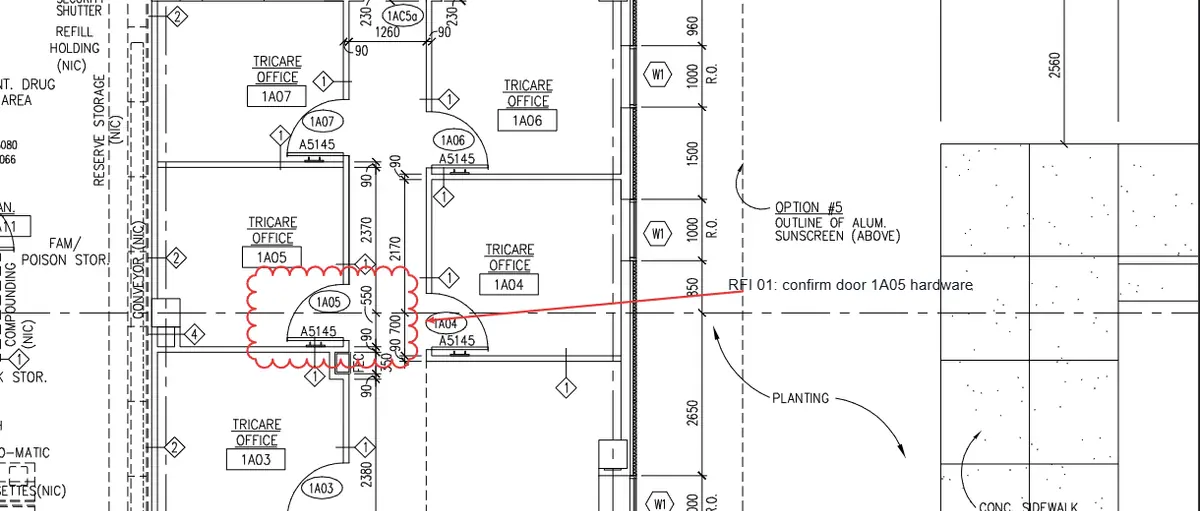
Habits that keep redlines readable: cloud first, then note, so the reason is visible at a glance; number your questions (RFI 01, RFI 02) so answers can be matched; use whiteout rather than scribbling over superseded content; and keep markups on a busy sheet aligned so they do not bury the drawing.
The markup toolkit
- Clouds, callouts, text and notes for revisions and RFIs.
- Highlights, shapes, lines, arrows and freehand ink for fast markup over any sheet, plus highlight, underline and strikeout that follow real PDF text.
- Stamps with live author and date fields, and auto-numbering sequences for approvals and numbered punch items.
- A 251-symbol CAD library across 16 trades so valves, devices and fixtures land as clean symbols.
- Snap to geometry so lines and symbols land on the drawing's own linework.
- Punch and issue pins with numbered locations, and a punch list report.
- Hyperlinks and snapshots to link a sheet to another sheet or page, or to place a captured region elsewhere.
- Save your own tools. Put a markup you use often, with its color and style, in the Tool Chest.
Markup and measurement in one toolbar
Most PDF tools make you choose between annotating and quantifying. Here you set the scale once, from the sheet's scale note, a standard preset or a known dimension, and then switch between a cloud and an area measurement without leaving the sheet. Areas, lengths, perimeters, volumes and counts read in feet or metres with running totals, and export to Excel.
If you want to see what that looks like on a real drawing, our step-by-step takeoff example measures five offices on a public-domain plan sheet, including a scale check against a printed dimension.
Edit PDF pages, forms and redaction
Beyond markup, TRACEBUILD Lite edits the document itself: reorganize pages, fill and create forms, remove content for good with true redaction, and number a whole set. It does not rewrite the text already in a drawing; you cover it, remove it or add new text over it, which keeps the original drawing intact as the record.
- Page tools. Insert, delete, rotate and crop pages, and combine several PDFs into one set, with bookmarks and slip-sheets for large sets.
- Forms. Create and fill AcroForm fields, and import FDF and XFDF form data.
- Whiteout and true redaction. Whiteout covers content; redaction removes it from the file, so it cannot be recovered by copying or searching.
- Headers, footers and Bates numbering with continuous numbering across a set.
- Save and print. Save as PDF, editable PDF, PNG or JPEG, and print to plotter and paper sizes with a preview.
- Search and OCR. Search text across every sheet, search visually for a symbol, and run OCR on scanned sheets with no text layer.
Password protection with AES-256, digital signatures, live collaboration sessions and batch processing are part of TRACEBUILD Pro, the Windows app, which is coming soon.
Replacing a desktop markup tool?
If your team runs Bluebeam Revu for everyday redlining and measuring, TRACEBUILD covers that work in the browser. It does not replace Studio Sessions or Revu's plugin ecosystem. The honest side-by-side is on TRACEBUILD vs Bluebeam Revu, and if you are on Revu 20, here is what changes on December 31, 2026.
Common questions
What is the best way to mark up construction drawings?
Use a PDF markup tool with revision clouds, callouts and a symbol library, and keep each markup to one question or instruction. Cloud the change, explain it in a note, number the RFIs, and save the markups into the PDF so everyone sees the same thing. A tool that also measures to scale saves a second program.
Can I measure to scale while I mark up?
Yes. Markup and measurement share one toolbar. Set the scale from the sheet's scale note, a standard preset or a known dimension, then switch between a cloud and the Length, Area, Perimeter, Volume or Count tool without leaving the sheet. Measurements total by item and export to Excel or CSV.
Is the PDF markup software free?
TRACEBUILD Lite, with the full markup, page editing, forms, redaction and measurement tools, is free during early access and runs in the browser with no download and no credit card. At launch Lite becomes $4.99 per user per month. TRACEBUILD Pro, the Windows app, is coming soon.