On-Screen Takeoff alternatives in 2026: prices, platforms and trade-offs
The right On-Screen Takeoff alternative depends on what you need. In a browser or on a Mac: TRACEBUILD Lite, STACK or ConstructConnect Takeoff. On a Windows desktop: PlanSwift. For AI-first takeoff: Togal.AI or Beam AI. For markup-first work: Bluebeam. Prices below come from each vendor's own site, checked September 24, 2026.
Why estimators look for an On-Screen Takeoff alternative
Usually for one of three reasons: the office is moving to Macs or laptops that do not run Windows desktop software well, the price is quote-only and hard to budget per seat, or occasional users do not need a full desktop takeoff seat. None of these say OST is a bad tool; it is a mature one.
- It is Windows software. ConstructConnect's system requirements list Windows 11 Pro or Enterprise. On a Mac, Boot Camp is supported, while Parallels is not supported by ConstructConnect's technical support, and on Apple M-series Macs virtualization is the only option because Boot Camp is not available there.
- No published price. ConstructConnect does not publish a price for On-Screen Takeoff; its product page says pricing varies by licensing option. There is a free 14-day trial.
- Seat economics. A project manager who measures a few sheets a month rarely justifies a full desktop takeoff seat. Browser tools with lower entry prices fill that gap.
Sources: On-Screen Takeoff, Quick Bid, and Digital Production Control: System Requirements; ConstructConnect pricing; On-Screen Takeoff product page. Checked September 24, 2026.
The alternatives at a glance
Free options first, then paid tools. "Where drawings live" tells you whether your plans stay on your computer or are stored in the vendor's cloud.
| Tool | Free option | Lowest published paid price (checked Sept 24, 2026) | Platforms | Where drawings live | Best for |
|---|---|---|---|---|---|
| On-Screen Takeoff (for reference) | 14-day trial | Quote only (source) | Windows desktop | Your computer | High-volume, condition-based bidding |
| TRACEBUILD Lite | Free during early access | $4.99 per user per month at launch (our pricing) | Browser (Chrome, Edge, Safari, Firefox) | Your device, by default | Low-cost browser takeoff and markup |
| STACK | Free version of Takeoff & Estimate | From $249 per user per month (source) | Web-based | Vendor cloud | Cloud takeoff plus estimating |
| ConstructConnect Takeoff | "Try it free" offer (terms not listed) | $1,200 per seat per year, Starter, 25 pages per project (source) | Browser, Mac or Windows | Vendor cloud | OST users who want a browser tool from the same company |
| PlanSwift | 14-day trial | $2,000 per year, 1 seat, Essential (source) | Windows desktop | Your computer | Assembly-based takeoff and estimating |
| Togal.AI | No free plan listed | $299 per user per month, billed yearly (source) | Browser | Vendor cloud | Automated area takeoff |
| Beam AI | None listed | From $8K annual license per trade, do-it-yourself (source) | Cloud platform or done-for-you service | Vendor cloud | Trades that want takeoffs done for them |
| Bluebeam (Revu) | 14-day trial of Max | $260 per user per year, Basics (source) | Windows desktop, plus web and mobile | Your computer; cloud for web and Studio | Markup-first teams and Studio collaboration |
Prices are the lowest published entry price for a paid plan that includes takeoff, taken from each vendor's site on September 24, 2026. They change; check the linked page before you budget.
How each alternative compares to OST
TRACEBUILD Lite
A browser tool for PDF markup, measurement and quantity takeoff, with one-click room and wall detection that you review before accepting (wall tracing has a published wall-detection benchmark), and Excel export. It is free during early access and $4.99 per user per month at launch; drawings are processed on your own device by default. Watch out for: there is no condition library, typical groups or Quick Bid link, and estimating with costs and labor is part of TRACEBUILD Pro, a Windows app that is coming soon. Our worked takeoff example shows what it does on a real sheet, including where detection needed fixing.
STACK
A web-based takeoff and estimating platform with a free version of its Takeoff & Estimate product, paid plans from $249 per user per month, and a two-week trial for its field product. It runs on any computer with a browser. Watch out for: the pricing page does not list the free version's limits, so test it on a real project before you count on it.
ConstructConnect Takeoff
A browser-based takeoff app from the company behind On-Screen Takeoff and PlanSwift. ConstructConnect says it runs in the browser on Mac or Windows with no install. Starter is $1,200 per seat per year with a 25-page limit per project; Professional is $2,200 per seat per year with unlimited pages. Watch out for: it is a separate product, not OST in a browser, and the pricing page notes annual contracts and no refunds for unused time.
PlanSwift
A Windows desktop tool built around drag-and-drop assemblies, with Essential at $2,000 and Core at $3,000 per seat per year and a 14-day free trial. Watch out for: it has the same Windows requirement as OST; on a Mac, ConstructConnect says you need Boot Camp or a virtual machine such as Parallels. More on PlanSwift vs TRACEBUILD.
Togal.AI
An AI-first browser tool: the Growth plan at $299 per user per month billed yearly includes unlimited automated takeoffs, and teams of four or more get custom pricing. Watch out for: the pricing page shows no free plan; its "Try Now" button leads to booking a demo.
Beam AI
Sold as annual licenses tailored to trade and bid volume: do-it-yourself software from $8K per trade per year, or done-for-you takeoffs from $25K per year. Watch out for: it is priced for firms bidding at volume, not for an occasional takeoff.
Bluebeam
The markup-first choice. Plans run from Basics at $260 to Max at $590 per user per year, billed annually, and include Revu for Windows plus Bluebeam on web and mobile. Watch out for: Revu's takeoff is measurement markups rather than an OST-style condition workflow. If you are on Revu 20, read what changes on December 31, 2026.
What On-Screen Takeoff still does better
OST has workflow features built for estimators who bid every day, and a browser tool does not replace all of them. These are the ones ConstructConnect highlights on its own product page. If you rely on them, weigh that before switching, or keep an OST seat for those bids.
- Multi-Condition Takeoff. ConstructConnect describes it as a patented tool that lets you select several conditions and draw the takeoff for all of them at once.
- Typical areas, groups and repeating pages. Take off a typical unit or floor once and reuse it.
- Overlay. Compare drawings side-by-side and spot differences.
- Auto count, styles and templates. Auto count of objects, annotations and callouts; conditions saved as styles organized by trade or discipline.
- Quick Bid integration. Quantities flow into ConstructConnect's estimating software.
Moving from OST conditions to TRACEBUILD
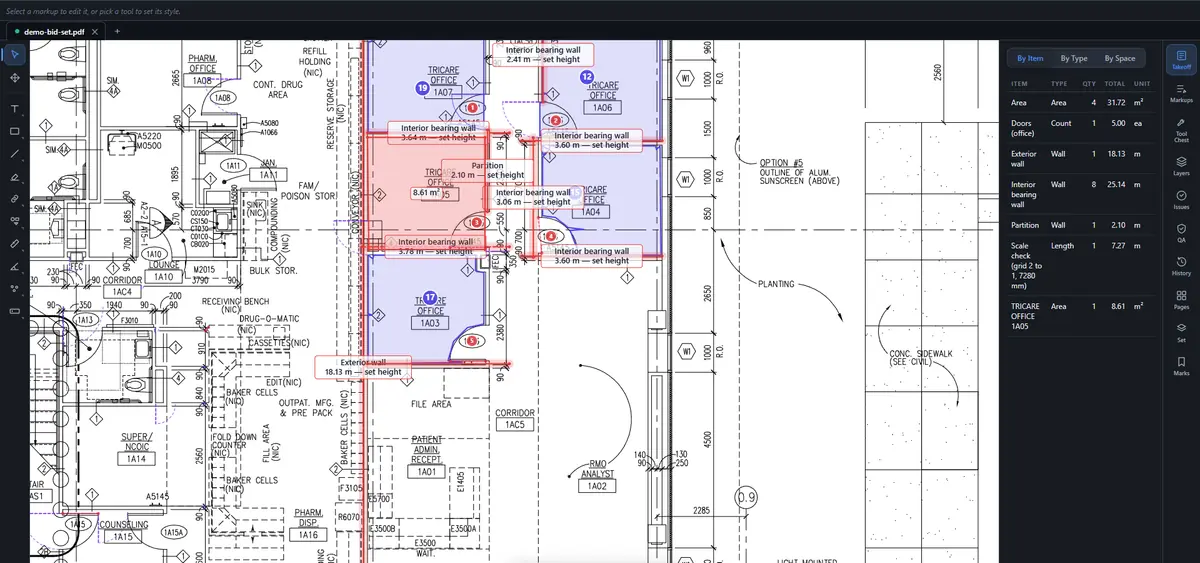
The concepts map closely, with one gap. An OST condition is a named item with a measurement type and a style. In TRACEBUILD the same thing is an item name (the Subject field) plus the tool you measure it with: Area, Length, Perimeter, Count, Volume or Wall. Every measurement with the same item name rolls up into one line of the takeoff, which is what a condition total does in OST.
- Condition names become item names. Type the name once in the Subject box before you measure, such as "Doors (office)" or "VCT, offices".
- Condition styles become saved presets. Save a tool with its color, line and name to the Tool Chest, so the next job starts one click away.
- Condition totals become the Takeoff sheet. The Excel export lists every measurement, then totals by item, by space and by layer and type, with a stable key on each row for your pricing sheet.
- The gap: typical groups. There is no equivalent to OST's typical areas and groups today. Repeated units are measured once per occurrence, or once and multiplied in your estimate.
Common questions
Is there a free alternative to On-Screen Takeoff?
Yes, with limits. TRACEBUILD Lite is free during early access and runs in the browser, and STACK offers a free version of its takeoff product. Neither replaces OST's condition and typical-group workflow. Most other alternatives, including PlanSwift and ConstructConnect Takeoff, offer free trials rather than free plans.
Does On-Screen Takeoff work on a Mac?
Not natively. ConstructConnect lists Windows 11 Pro or Enterprise as the operating system. On a Mac, Boot Camp is supported, while Parallels is not supported by its technical support team, and on Apple M-series Macs virtualization is the only option because Boot Camp is unavailable there.
Is On-Screen Takeoff free?
No. ConstructConnect does not publish a price for On-Screen Takeoff; its product page says pricing varies by licensing option. It offers a free 14-day trial. If you need a no-cost tool, look at the free options in the comparison table above.
Is On-Screen Takeoff being replaced?
Not according to ConstructConnect's site as of September 2026. On-Screen Takeoff is still sold and promoted. ConstructConnect Takeoff, a browser product from the same company, is listed as a separate product alongside it, not as a successor. Check with ConstructConnect before you plan around either.